Last Updated on October 10, 2026 by Practical Astrophotography Staff
PhotoCraft: The Open-Source Photoshop Challenger That Astrophotographers Should Be Watching
Could a free, community-driven image editor become an essential part of the astrophotographer’s digital darkroom? PhotoCraft is an exciting new contender, with the layers, masks, and tonal controls that make sophisticated deep-sky image processing possible. Here’s why it deserves attention—and what astronomers need to know before making the switch.
A New Contender for the Astrophotography Digital Darkroom
Astrophotography has never been an inexpensive hobby. Between the telescope, mount, camera, filters, guiding system, power supply, and countless accessories, it is easy to spend thousands of dollars before capturing a single satisfying image of a distant galaxy.
Then comes the processing.
After hours spent collecting photons from objects millions of light-years away, we return indoors to another demanding task: transforming a collection of dark, noisy, seemingly unimpressive frames into an image that reveals the structure of the universe. This is where software becomes every bit as important as the equipment used under the night sky.
For years, Adobe Photoshop has been a familiar part of that final stage. Its layers, masks, curves, selections, and blending modes have helped astrophotographers reveal faint nebular filaments, tame unruly stars, balance color, and produce polished images suitable for printing or publication.
But Photoshop comes with a subscription, and not every amateur astronomer wants another recurring expense. Others prefer software that can be inspected, modified, and improved by its community rather than controlled by a commercial vendor.
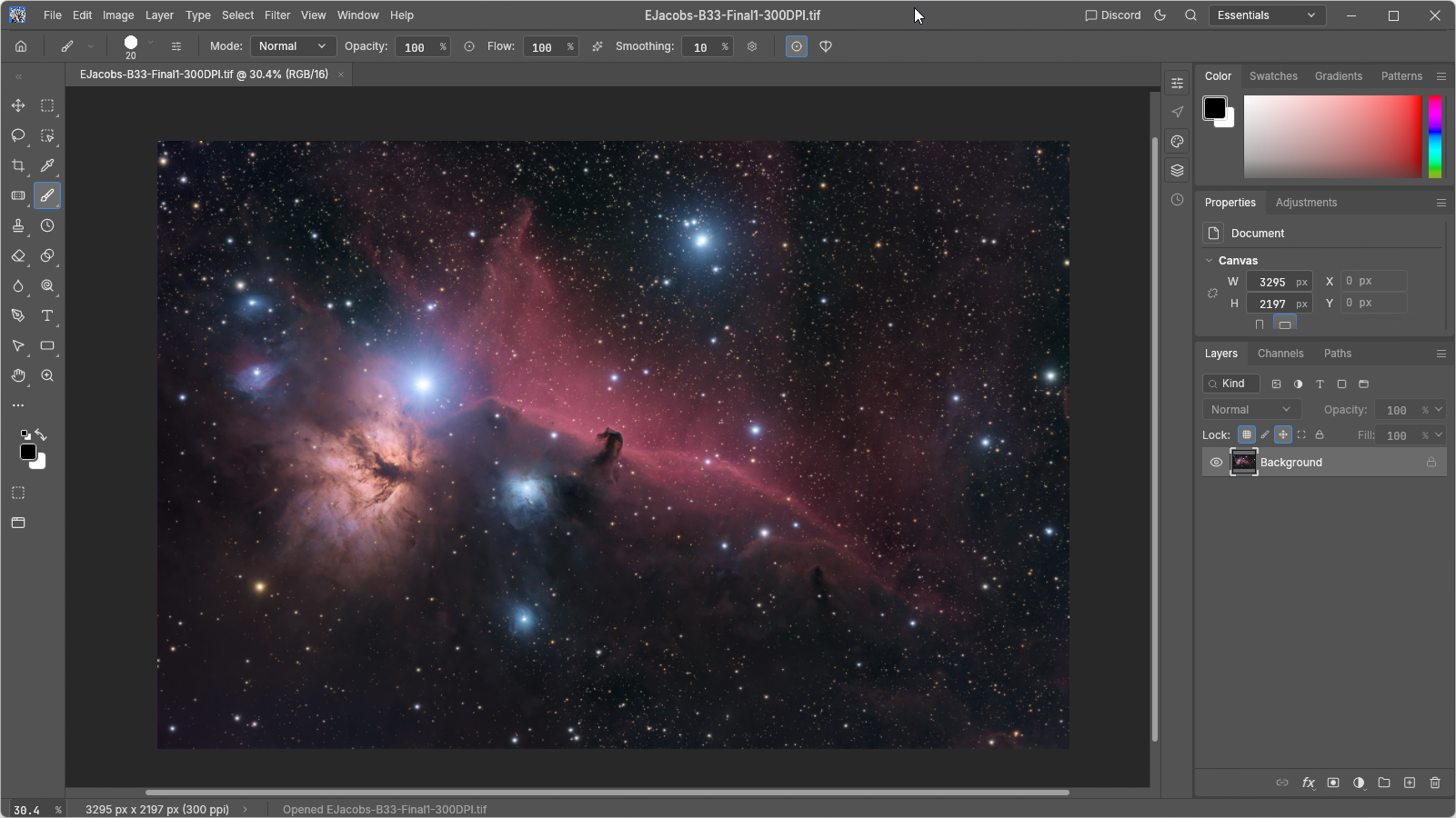
Enter PhotoCraft, a new open-source image editor designed as a clean-room reimplementation of Photoshop-style editing workflows. Written in Rust, it aims to provide a familiar layer-based environment, support layered PSD files, and make sophisticated image editing available without a traditional subscription.
The project is particularly interesting to astrophotographers because so much of our work depends on precise, localized adjustments rather than simply applying a filter and hoping for the best.
There is an important caveat, however. PhotoCraft is still in early alpha, and it is not a dedicated astronomical image-processing package. Its potential lies primarily in the creative and finishing stages of image processing, not in replacing the specialized tools used to calibrate, register, and stack astronomical exposures.
That distinction does not make it less exciting. It makes the project worth evaluating for the right reasons.
What Exactly Is PhotoCraft?
PhotoCraft is an open-source image editor developed by the ArtCraft team. Its stated goal is to reproduce Photoshop-style editing workflows from scratch, without incorporating Adobe's proprietary code or assets.
The project is written in Rust, a programming language known for its emphasis on performance and memory safety. According to its project documentation, PhotoCraft combines a native desktop interface with GPU-accelerated compositing, multithreaded filters, and a document model built around editable layers and effects.
It supports familiar editing concepts, including:
- Pixel layers, groups, and masks.
- Non-destructive adjustment layers.
- Curves, Levels, Vibrance, and Hue/Saturation adjustments.
- Multiple blend modes and layer opacity controls.
- Selections, brushes, cloning, healing, and sharpening tools.
- Layered PSD and PSB document support.
- High-bit-depth documents and several common image formats.
The project also offers a native document format and describes support for Windows, macOS, Linux, FreeBSD, and WebAssembly-based browser environments. Availability and maturity can vary by platform and release, so it is worth checking the official release information before installing it.
Official project: https://github.com/storytold/photocraft
The source code is dual-licensed under MIT or Apache-2.0, making it an appealing option for users who value open-source software and the freedom to examine or contribute to its development.
For an astrophotographer, the most important question is not whether PhotoCraft can reproduce every Photoshop menu. It is whether the tools it already provides can help us produce better astronomical images.
That is where things get interesting.
Why Layers Matter So Much in Astrophotography
If there is one concept that separates basic photo editing from sophisticated deep-sky processing, it is the ability to make different adjustments to different parts of an image.
Consider a photograph of the Orion Nebula. The bright central region surrounding the Trapezium can easily become overexposed, while the outer hydrogen-alpha structures remain frustratingly faint. Meanwhile, the surrounding sky may contain gradients, subtle dust, and stars of different colors and brightnesses.
A global contrast adjustment cannot solve all these problems simultaneously. Increasing contrast to reveal the outer nebula may clip the bright core. Lifting the faint structures can brighten the background and make the noise more obvious.
This is precisely why astrophotographers rely on layers and masks.
A layer lets us isolate an adjustment. A mask determines where that adjustment takes effect. Together, they make it possible to treat different regions of the same image independently.
PhotoCraft's documented support for layers, masks, and adjustment layers gives it a useful foundation for this style of work.
Imagine creating separate layers for the following tasks:
- A gentle global tonal adjustment to establish the overall image.
- A masked Curves adjustment to bring out faint nebulosity.
- A separate treatment for the bright central region.
- A restrained color adjustment to emphasize the nebula's natural emission colors.
- A star layer that can be adjusted independently from the background structures.
This is a conceptual workflow, not a claim that PhotoCraft has a dedicated one-click astrophotography pipeline. The point is that its general-purpose editing tools lend themselves to the same principles used in advanced astronomical image finishing.
The ability to return to an adjustment, modify its strength, or disable it entirely is especially valuable. Instead of repeatedly altering the underlying pixels, we can preserve the original image and refine our decisions as the processing develops.
For anyone who has spent an evening trying to undo an overly aggressive edit, that flexibility is more than a convenience.
It is essential.
Curves and Levels: Bringing Faint Structures Out of the Darkness
Astrophotography is fundamentally an exercise in managing dynamic range.
Many deep-sky targets contain structures with enormous differences in brightness. The core of a galaxy may be relatively bright, while its outer halo is barely distinguishable from the background. Emission nebulae can contain intensely illuminated regions alongside delicate wisps of gas.
Curves and Levels are among the most useful tools for managing these differences.
Levels provides direct control over the black point, midtones, and white point. Curves allows more selective manipulation of tonal relationships across the image.
Used carefully, these tools can lift faint structures without destroying the overall contrast that makes an astronomical photograph compelling.
PhotoCraft documents Curves adjustment layers with per-channel editing and Levels adjustments with a live Histogram. These are meaningful features for anyone working with complex images.
Working with Curves
Suppose you have captured the Rosette Nebula. The central region is visible, but the outer emission appears weak. A carefully designed curve can brighten the midtones while preserving the brightest portions of the nebula.
A second adjustment might target the red channel to refine the hydrogen-alpha appearance. A mask could limit that change to the nebular structures rather than affecting every star and the entire background.
The important word here is carefully.
An aggressive curve can produce unnatural colors, amplify noise, and make background gradients much more visible. It can also flatten the delicate tonal transitions that give a nebula its three-dimensional appearance.
The ability to make adjustments on separate layers provides a safer environment for experimentation.
PhotoCraft's documented Curves and Levels capabilities are therefore promising, although astrophotographers should test their behavior on actual high-bit-depth astronomical data before relying on them for critical work.
The Power of Masks: Editing the Nebula Without Destroying the Stars
Stars are simultaneously one of the most beautiful and most troublesome elements of deep-sky imaging.
A long integration can reveal astonishing amounts of faint nebulosity, but the stars may become bloated, overpowering the subject. Bright stars can dominate the composition, and their color may be difficult to preserve while increasing contrast in the surrounding nebula.
This is one reason experienced astrophotographers frequently separate their processing decisions by image region or by astronomical component.
A mask provides a way to apply an adjustment selectively.
For example, an astrophotographer could use a selection or painted mask to restrict a Curves adjustment to the central nebula. Another mask could protect the brightest stars while the surrounding background is darkened slightly.
PhotoCraft supports layer masks and selection tools, including marquee selections, lassos, and other selection methods described in its documentation.
These are useful building blocks, but there is a distinction worth emphasizing: a general-purpose selection tool is not the same thing as an astronomy-specific star mask generator.
Dedicated astrophotography software often offers star detection, star masks, luminance-based masks, and specialized processes designed around astronomical data. PhotoCraft's general-purpose tools should not be assumed to reproduce those workflows automatically.
Nevertheless, the underlying editing philosophy is the same. Separate the elements that need different treatment, then adjust each with restraint.
For beginners, learning to work with masks can be one of the biggest improvements in image-processing technique. For experienced imagers, a flexible layer-based editor can provide a convenient finishing environment once the technically demanding processing has been completed elsewhere.
Color Control: Preserving the Beauty of the Cosmos
Color is one of the most subjective aspects of astrophotography.
Some photographers favor natural-looking images that emphasize the differences between stellar populations and emission regions. Others prefer a more dramatic presentation, with enhanced contrast and stronger separation between warm and cool structures.
Neither approach is inherently wrong, provided the processing remains intentional and the image is not presented as a scientifically faithful representation when it is primarily an artistic interpretation.
PhotoCraft includes adjustment tools such as Vibrance, Hue/Saturation, Channel Mixer, Selective Color, and Color Lookup. These offer several ways to refine the color of an image.
Imagine processing a photograph of the Cygnus Wall in the North America Nebula. The red emission may be strong, but the surrounding dust and background structures could benefit from more tonal separation. A modest color adjustment might improve the visibility of those features without turning the entire image into an oversaturated red mass.
Alternatively, an image of the Pleiades might need a much lighter touch. The reflection nebula's blue structures are subtle, and excessive saturation or contrast can quickly make them look artificial.
The advantage of an adjustment-layer workflow is that the photographer can experiment without committing permanently to each change.
However, there is a critical technical limitation to understand. PhotoCraft's color controls are general-purpose image-editing tools. They do not replace specialized calibration, photometric color correction, or channel combination methods used in scientific or advanced amateur astronomical processing.
For best results, color decisions should begin with properly calibrated and processed data, not with an attempt to repair every upstream problem in the final editor.
Noise Reduction and Sharpening: Useful Tools, With Important Limits
Noise is an unavoidable part of astrophotography.
Even under dark skies, the sensor introduces read noise, and the incoming photons follow statistical distributions. Light pollution, thermal signal, short integrations, and aggressive stretching can make the background increasingly difficult to manage.
The most effective solution is usually to address noise at the appropriate stage of the workflow. That means sound calibration, sufficient integration time, appropriate Stacking, and carefully chosen noise-reduction methods.
PhotoCraft documents filters including Reduce Noise and several sharpening options. These can be useful for general image finishing, especially when a processed image needs a modest final adjustment.
But it is important not to confuse ordinary photographic noise reduction with the specialized algorithms found in dedicated astronomical applications.
A general-purpose filter may soften faint stars, erase subtle dust, or smear low-contrast nebular filaments if pushed too far. Sharpening can make the opposite problem worse by exaggerating noise, creating halos, and introducing an artificial appearance around bright stars.
A sensible approach would be to finish the major noise-management work in a tool designed for astronomical data, then use PhotoCraft for conservative refinements if testing shows that its filters suit the image.
Always compare the result at full resolution. A photograph that looks wonderfully smooth when reduced to fit a screen may have lost significant detail when examined at its native pixel dimensions.
The aim is not to make the background perfectly smooth. It is to preserve as much real detail as possible while keeping distracting artifacts under control.
A Familiar Workflow Could Make the Transition Easier
One of PhotoCraft's most appealing design goals is familiarity.
Its project documentation describes Photoshop-style menus, shortcuts, panels, layers, masks, and editing conventions. For photographers who have already spent years using Photoshop, that approach could reduce the learning curve.
This matters because astrophotographers often work with complicated projects that involve numerous intermediate files, masks, adjustments, and versions.
A familiar interface can make it easier to concentrate on the image rather than continually searching for basic tools.
PhotoCraft also supports layered PSD and PSB documents. That may be useful when collaborating with other photographers or opening an existing layered project.
The developers report that their tests preserve the rendered appearance of most files in a PSD test corpus, but that does not guarantee that every document, blend mode, smart object, or specialized effect will behave exactly as it does in Photoshop.
Before migrating a valuable project, make a copy and test it carefully. Open the file, inspect its layers, compare the rendered image, save a new version, and reopen that version. Do not overwrite your only copy of an important project.
For astrophotographers, this is particularly important because an elaborate image may represent many hours of processing decisions.
Compatibility is useful. A reliable backup is indispensable.
Open Source Means More Than Free Software
The financial argument for PhotoCraft is straightforward: an open-source editor can reduce dependence on subscription-based software.
But the appeal of open source goes beyond cost.
Astrophotography has a strong tradition of community-built tools. Amateur astronomers share acquisition techniques, processing methods, scripts, calibration advice, and discoveries. Software that can be inspected and improved by contributors fits naturally into that culture.
PhotoCraft's MIT or Apache-2.0 licensing gives developers considerable freedom to study, modify, and redistribute the software under the terms of the chosen license.
Its documented command-based architecture is also noteworthy. The project describes a common command registry that can be accessed through the interface and other automation mechanisms.
That architecture could eventually be useful for repetitive finishing tasks. A photographer might want to apply consistent export settings, prepare multiple images for a website, or automate a sequence of ordinary adjustments.
Such possibilities are interesting, but they should not be mistaken for an existing, fully developed astrophotography automation system. Any workflow that processes scientific or high-value image data needs careful validation before its output can be trusted.
There is also a practical advantage to local editing. PhotoCraft is designed to work offline, so the ordinary act of editing an image need not depend on a cloud-based processing service. That can be attractive to photographers who prefer to keep their original data on their own computers.
Open source does not automatically guarantee flawless software, perfect security, or long-term maintenance. It does, however, offer a model in which users can inspect the code, report problems, contribute improvements, and build on the work of others.
For a specialist hobby with such a technically engaged community, that is a compelling foundation.
Where PhotoCraft Fits in a Real Astrophotography Workflow
To understand the software's potential, it helps to consider the complete journey from photons to finished image.
Stage 1: Acquisition
The process begins at the telescope. The mount tracks the target, the camera records exposures, and the photographer collects light frames along with Calibration frames as appropriate.
PhotoCraft does not replace the capture software, mount control, guiding system, or camera drivers involved in this stage.
Stage 2: Calibration and stacking
Next comes the technical processing that transforms many individual exposures into a cleaner, more detailed master image.
Dedicated astronomical tools handle tasks such as calibration with darks and flats, image registration, rejection of unwanted pixels, and stacking. Depending on the workflow, they may also provide gradient removal, deconvolution, photometric color calibration, and specialized star processing.
These operations are not interchangeable with ordinary photo editing.
PhotoCraft should not be treated as a replacement for this stage unless future versions specifically implement and validate the necessary astronomical functionality.
Stage 3: Stretching and structural processing
The stacked image may initially appear almost black because astronomical data often contain a large amount of information concentrated in the shadows.
Specialized processing tools are designed to stretch this data, manage gradients, and reveal structures while retaining control over noise and dynamic range.
This stage may involve logarithmic or nonlinear stretches, background correction, star separation, and carefully controlled sharpening.
An astrophotographer should complete the demanding technical work in suitable astronomical software before deciding whether PhotoCraft adds value.
Stage 4: Creative finishing
This is where PhotoCraft looks particularly promising.
Once a clean, stretched image has been exported into a suitable format, the photographer can explore layer-based adjustments, localized color corrections, selective contrast, restrained sharpening, and compositional finishing.
A layered editor is especially useful when the goal is to balance the image as a whole without losing the ability to revisit individual decisions.
Stage 5: Export and presentation
The final image may need to be prepared for a website, competition, print, or social media.
PhotoCraft documents export controls for common image formats and provides a range of general editing tools that can help with the presentation stage.
For critical work, verify the output dimensions, bit depth, color profile, and compression settings. Keep a high-quality master file as well as a separate version optimized for display.
The key takeaway is simple: PhotoCraft may be most useful as one component in a broader workflow rather than as a complete astronomical processing environment.
The Limitations Astrophotographers Should Know About
It is tempting to see a new open-source competitor to Photoshop and immediately imagine replacing an entire established processing setup.
That would be premature.
PhotoCraft's own project documentation identifies it as early-alpha software and acknowledges gaps in feature completeness, specialized tools, professional workflows, and plugin compatibility.
For astrophotographers, several practical questions remain.
First, high-bit-depth handling must be tested in practice. The project documents support for 8-, 16-, and 32-bit-per-channel documents, including several color modes. That is encouraging, but photographers should test their actual image formats and confirm that precision is preserved through the operations and exports they use.
Second, specialized astronomy tools remain important. Dedicated applications can provide features such as star separation, astronomical background extraction, sophisticated stretching, and calibration-aware processing. General-purpose layer editing is not a substitute for those capabilities.
Third, performance depends on the real workload. PhotoCraft describes GPU compositing and multithreaded filters, but the experience of editing a small photograph may differ significantly from working with a very large astronomical panorama or a deeply layered, high-resolution image. Test it with representative files from your own camera.
Fourth, compatibility is not absolute. PSD support is useful, but photographers should not assume that every existing Photoshop document or plugin will transfer seamlessly.
Finally, the project is still evolving. Features can change, bugs can emerge, and workflows may not yet be as polished as they are in mature commercial applications.
None of these concerns is unusual for a young open-source project. They simply mean that PhotoCraft should currently be approached as an opportunity to experiment, not as a guaranteed drop-in replacement for every professional workflow.
Who Should Try PhotoCraft First?
PhotoCraft is worth investigating if you fall into one of several groups.
- The budget-conscious astrophotographer: You want a capable layer-based editor without another recurring subscription.
- The Photoshop user exploring alternatives: You already understand masks, Curves, and adjustment layers and want to see how much of your workflow can be reproduced.
- The open-source enthusiast: You value transparent development, permissive licensing, and the opportunity to contribute to a growing project.
- The experienced imager who likes experimenting: You already have a reliable astronomical processing pipeline and want another tool for final image finishing.
- The automation-minded photographer: You are interested in how a command-driven editor might eventually fit into repeatable image-processing tasks.
It may be less suitable as your only processing application if you depend on a mature set of astronomy-specific plugins, advanced specialized operations, or a thoroughly tested production workflow.
For a beginner, I would recommend learning the fundamentals of calibration, stacking, stretching, masks, and tonal control before worrying too much about which finishing editor to use. Good processing technique matters more than the brand name in the title bar.
How to Evaluate PhotoCraft on Your Own Images
The best way to judge any new image editor is to test it on a real project rather than on a demonstration image.
Choose a finished master image that you know well. A bright nebula with a difficult core, a galaxy with faint outer structure, or a star field with a mixture of bright and faint stars can be a useful test.
Begin by opening a copy of the image. Inspect the histogram and verify that the image looks as expected. If the source is a high-bit-depth TIFF or another supported format, confirm that it opens correctly and retains the expected dimensions and tonal appearance.
Next, try a simple Curves adjustment. Make a subtle change to the midtones, compare the result with the original, and see whether the interface makes it easy to refine or reverse the adjustment.
Add a mask and restrict the change to a small region. This tests one of the most important practical aspects of astrophotography finishing: whether you can make a useful local correction without damaging the rest of the image.
Then experiment with color. Keep the changes conservative, and watch the background for unwanted tints. Pay particular attention to star colors and faint structures that may be lost through excessive saturation or contrast.
Finally, export a copy and compare it against the source at full resolution. Check for unexpected color shifts, banding, lost detail, or other artifacts.
Repeat the experiment with a second image and a more complicated layer stack. If the software handles both comfortably, you will have a much better sense of where it belongs in your workflow.
Keep the original files untouched throughout the process. The goal is to evaluate PhotoCraft, not to risk a hard-won image.
The Verdict: A Project Worth Watching
PhotoCraft arrives at an interesting moment for digital imaging. Photographers have become accustomed to sophisticated software, but many are also reconsidering subscription costs, cloud dependence, and the advantages of open development.
Its combination of layers, masks, tonal adjustments, broad image-format support, and Photoshop-style conventions gives it a useful starting point for astrophotography finishing.
The potential is easy to understand. Deep-sky processing often involves subtle, localized decisions: lifting a faint halo, protecting a bright core, balancing color, reducing distractions, and refining the relationship between stars and nebulosity. A capable layer-based editor can make those decisions easier to manage and revisit.
Still, the distinction between potential and proven capability matters.
PhotoCraft is not yet a comprehensive replacement for Photoshop in every professional workflow, nor is it a replacement for the specialized software that astronomers use to calibrate and stack their data. Its early-alpha status means that users should expect rough edges and verify important results themselves.
For now, I would approach it as a promising addition to the astrophotographer's digital darkroom. Keep your established astronomical processing tools, experiment with PhotoCraft on copies of your finished images, and pay attention as the project matures.
The most exciting part of open-source software is not necessarily that it can replace an established product overnight. It is that a growing community can steadily improve a tool, add capabilities that users genuinely need, and make advanced creative work more accessible.
For astrophotographers who spend their nights collecting photons and their days turning them into images, that is a future worth watching.
Clear skies, steady seeing, and happy processing.
Official resources
- Source code and project documentation: https://github.com/storytold/photocraft
- PhotoCraft project website: https://getartcraft.com/apps/photocraft
- Releases and downloads: https://github.com/storytold/photocraft/releases
Editorial note: PhotoCraft is an independent open-source project and is not affiliated with or endorsed by Adobe. Feature descriptions above are based on project documentation; astrophotography applications are practical workflow suggestions, not claims of dedicated astronomy-specific functionality.